github : https://github.com/kjinwoo12/UE5NetworkFps
이전 글 : https://duplicated.tistory.com/134
엔진 : Unreal Engine 5.8.3 (Lyra Starter Game 기반)
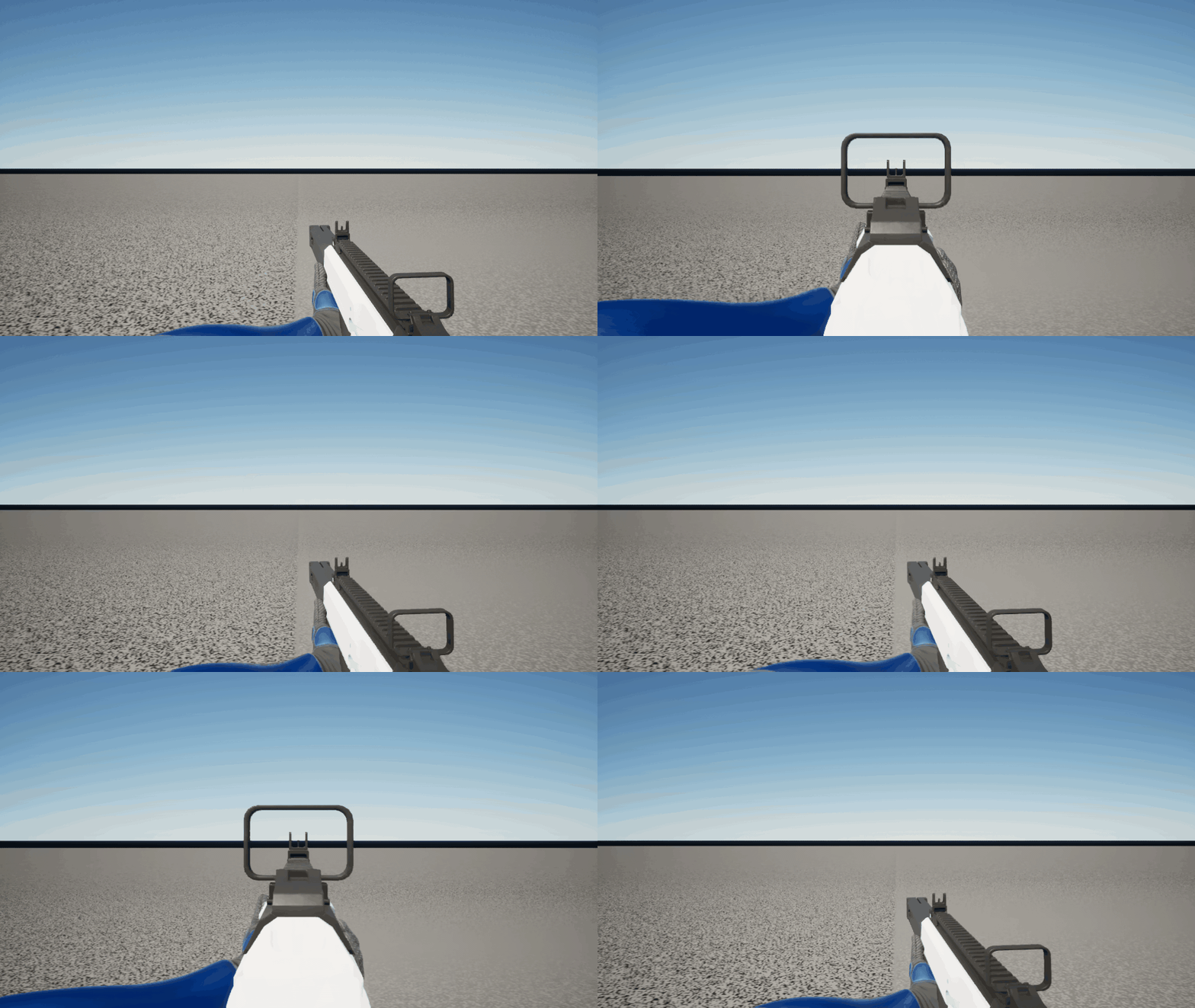
이번 글의 결과물이다. 우클릭을 누르고 있으면 0.2초 동안 화면이 조금 당겨지고, 총이 화면 가운데로 올라와 가늠자와 가늠쇠가 화면 정중앙에 겹친다. 우클릭을 떼면 같은 시간에 걸쳐 원래 자리로 돌아간다.
만들 것
이전글에서는 1인칭 몸에 로컬 전용 총을 붙이고, 손 모양은 그립 포즈 애니메이션이, 화면에서 총이 놓일 위치는 무기별 그립 프로필(UFpsWeaponGripProfile)이 정하도록 나눴다. 이번 글에서는 그 위에 정조준을 붙여볼 것이다.
우클릭을 누르는 동안 1인칭 카메라를 유지한 채 가늠자와 가늠쇠를 화면 정중앙에 맞추고, 시야각을 80°에서 64°로 줄이고, 총이 덜 흔들리게 한다. 다른 플레이어에게는 조준 자세가 보여야 한다.
시작 상태
이 글은 #2가 끝난 커밋(58564e96)에서 시작해서 정조준 커밋(0936a510)에서 끝난다. 바뀐 파일 전체는 아래에서 볼 수 있다.
https://github.com/kjinwoo12/UE5NetworkFps/commit/0936a510f1d4d749856b94ea43fedb6428fd81b9
시작할 때 이미 있던 것은 다음과 같다.
- 1인칭 카메라 모드
ULyraCameraMode_FirstPerson(FpsCore 게임 피처 플러그인) - 1인칭 몸의 애님 인스턴스
UFpsFirstPersonAnimInstance. 매 프레임 그립 프로필의WeaponViewOffset/WeaponViewRotation으로 총 뼈를 화면 기준 위치에 고정한다 - 무기 액터에 붙은
UFpsWeaponGripComponent와 소총용 그립 프로필DA_Grip_Rifle - 프로젝트 설정
UFpsFirstPersonSettings(DefaultGame.ini) - Lyra ShooterCore에 들어 있는 정조준 어빌리티
GA_ADS와 입력(IA_ADS, 우클릭,InputTag.Weapon.ADS)
이번에 만들거나 고친 것은 다음과 같다.
| 종류 | 이름 |
|---|---|
| 새 C++ | FpsAim.h, FpsAim.cpp |
| 고친 C++ | UFpsWeaponGripProfile, ULyraCameraMode_FirstPerson, UFpsFirstPersonAnimInstance, UFpsFirstPersonSettings |
| 새 에셋 | GA_Fps_ADS, AbilitySet_FpsHero (/FpsCore/Heroes/Shared/) |
| 고친 에셋 | DA_Grip_Rifle, HeroData_Soldier, HeroData_FpsGame |
| 설정 | DefaultGame.ini의 AimTag |
설계
정조준 상태는 태그 하나로 정한다. Lyra의 정조준 어빌리티가 활성화되어 있는 동안 폰의 어빌리티 시스템 컴포넌트(ASC)에 붙는 Event.Movement.ADS다. 이 태그를 세 곳이 각자 읽는다.
- 1인칭 카메라 모드: 시야각을 줄인다
- 1인칭 몸의 애님 인스턴스: 총을 허리 위치에서 가늠자 위치로 옮기고 흔들림을 줄인다
- 3인칭 애님 블루프린트: 조준 자세를 고른다. Lyra에 이미 있다
카메라와 1인칭 몸은 각자 0.2초짜리 블렌드를 돌리지만 같은 값과 같은 곡선을 써서 함께 움직인다. 총 위치, 줌 배율, 전환 시간처럼 무기마다 다른 값은 전부 그립 프로필에 둔다.
따라 만들기
1단계. 1인칭용 정조준 어빌리티 만들기
Lyra에는 이미 정조준 어빌리티 GA_ADS가 있다. 우클릭을 누르는 동안 활성화되고, 이동 속도와 마우스 감도(IMC_ADS_Speed)를 낮추고, 소리와 UI 알림을 낸다. 활성화되어 있는 동안에는 Event.Movement.ADS 태그를 폰의 어빌리티 시스템 컴포넌트(ASC)에 붙인다.
문제는 카메라다. GA_ADS는 활성화될 때 SetCameraMode로 카메라 모드를 CM_ThirdPersonADS로 바꾸고, 끝날 때 ClearCameraMode로 되돌린다. 1인칭에서 그대로 쓰면 우클릭할 때마다 어깨 너머 3인칭 카메라가 된다.
그래서 GA_ADS를 복제해서 GA_Fps_ADS를 만들고, 그래프에서 SetCameraMode와 ClearCameraMode 노드만 지웠다. 이동 속도, 감도, 소리, UI 알림은 그대로 둔다. 활성화 중 붙는 태그(ActivationOwnedTags = Event.Movement.ADS)와 입력 태그(InputTag.Weapon.ADS)도 원본 그대로다.
이 어빌리티를 영웅에게 주려면 어빌리티 세트를 바꿔야 한다. Lyra 슈터 영웅은 AbilitySet_ShooterHero로 GA_ADS를 받는다. 이걸 복제해서 AbilitySet_FpsHero를 만들고 GA_ADS 줄만 GA_Fps_ADS로 바꿨다. 그리고 이 프로젝트의 영웅 데이터 HeroData_Soldier, HeroData_FpsGame의 어빌리티 세트를 AbilitySet_FpsHero로 바꿨다.
2단계. 조준 상태 읽기
정조준 중인지는 1단계의 어빌리티가 붙이는 Event.Movement.ADS 태그로 판단한다. 어떤 태그를 볼지는 프로젝트 설정에 둔다.
// FpsFirstPersonSettings.h
UPROPERTY(Config, EditAnywhere, Category = "Aim")
FGameplayTag AimTag;
; DefaultGame.ini, [/Script/FpsCoreRuntime.FpsFirstPersonSettings]
AimTag=(TagName="Event.Movement.ADS")카메라와 애님 인스턴스가 같이 쓰는 함수는 FpsAim에 모았다. 정조준 판정, 지금 쥔 무기의 그립 프로필 찾기, 허리(0)에서 정조준(1)으로 넘어가는 블렌드다.
// FpsAim.h
namespace FpsAim
{
    bool IsAiming(const APawn* Pawn);

    /** Grip profile of the weapon actor attached to the pawn (UFpsWeaponGripComponent), or null. */
    const UFpsWeaponGripProfile* FindHeldGripProfile(const APawn* Pawn);
}

/** Hip (0) to sights (1) blend over the profile's AimBlendTime, eased at both ends. */
struct FFpsAimBlend
{
    void Update(bool bAiming, const UFpsWeaponGripProfile* Profile, float DeltaSeconds);
    void Reset() { Linear = 0.0f; }

    /** Eased alpha. */
    float GetAlpha() const;

private:
    float Linear = 0.0f;
};
// FpsAim.cpp
bool FpsAim::IsAiming(const APawn* Pawn)
{
const FGameplayTag& AimTag = GetDefault<UFpsFirstPersonSettings>()->AimTag;
const UAbilitySystemComponent* AbilitySystem = Pawn && AimTag.IsValid() ? UAbilitySystemGlobals::GetAbilitySystemComponentFromActor(Pawn) : nullptr;
return AbilitySystem && AbilitySystem->HasMatchingGameplayTag(AimTag);
}
const UFpsWeaponGripProfile* FpsAim::FindHeldGripProfile(const APawn* Pawn)
{
if (!Pawn)
{
return nullptr;
}
// The equipped weapon actor hangs off the pawn's mesh (the 1P copy off the cosmetic body below it).
TArray<AActor*> AttachedActors;
Pawn->GetAttachedActors(AttachedActors, true, true);
for (const AActor* Actor : AttachedActors)
{
const UFpsWeaponGripComponent* Grip = Actor ? Actor->FindComponentByClass<UFpsWeaponGripComponent>() : nullptr;
if (Grip && Grip->GetGripProfile())
{
return Grip->GetGripProfile();
}
}
return nullptr;
}
void FFpsAimBlend::Update(bool bAiming, const UFpsWeaponGripProfile* Profile, float DeltaSeconds)
{
const bool bTarget = bAiming && Profile && Profile->bCanAim;
const float BlendTime = Profile ? Profile->AimBlendTime : 0.0f;
Linear = BlendTime > 0.0f
? FMath::FInterpConstantTo(Linear, bTarget ? 1.0f : 0.0f, DeltaSeconds, 1.0f / BlendTime)
: (bTarget ? 1.0f : 0.0f);
}
float FFpsAimBlend::GetAlpha() const
{
return FMath::SmoothStep(0.0f, 1.0f, Linear);
}블렌드 값은 일정한 속도로 0과 1 사이를 오가고, 밖으로 내보낼 때만 SmoothStep으로 양끝을 부드럽게 한다. 그래서 정조준 도중에 우클릭을 떼도 그 자리에서 바로 돌아간다.
3단계. 가늠자 위치를 재서 그립 프로필에 넣기
그립 프로필에 정조준 값을 추가했다.
// FpsWeaponGripProfile.h
UPROPERTY(EditAnywhere, BlueprintReadOnly, Category = "Aim", meta = (EditCondition = "bCanAim"))
FVector AimWeaponViewOffset = FVector::ZeroVector;

UPROPERTY(EditAnywhere, BlueprintReadOnly, Category = "Aim", meta = (EditCondition = "bCanAim"))
FRotator AimWeaponViewRotation = FRotator::ZeroRotator;

UPROPERTY(EditAnywhere, BlueprintReadOnly, Category = "Aim")
bool bCanAim = false;

UPROPERTY(EditAnywhere, BlueprintReadOnly, Category = "Aim", meta = (EditCondition = "bCanAim", ClampMin = "0.0", Units = "s"))
float AimBlendTime = 0.2f;

UPROPERTY(EditAnywhere, BlueprintReadOnly, Category = "Aim", meta = (EditCondition = "bCanAim", ClampMin = "0.1", ClampMax = "1.0"))
float AimFieldOfViewScale = 0.8f;

UPROPERTY(EditAnywhere, BlueprintReadOnly, Category = "Aim", meta = (EditCondition = "bCanAim", ClampMin = "0.0", ClampMax = "1.0"))
float AimWeaponSwayScale = 0.25f;

/** Weapon bone transform in view space for an aim blend (0 hip .. 1 sights). */
FTransform GetWeaponViewTransform(bool bTrueFirstPerson, float AimAlpha) const
{
    const FTransform Hip(GetWeaponViewRotation(bTrueFirstPerson), GetWeaponViewOffset(bTrueFirstPerson));
    if (!bCanAim || AimAlpha <= 0.0f)
    {
        return Hip;
    }
    const FTransform Aim(AimWeaponViewRotation, AimWeaponViewOffset);
    FTransform Blended;
    Blended.Blend(Hip, Aim, FMath::Min(AimAlpha, 1.0f));
    return Blended;
}AimWeaponViewOffset은 정조준할 때 총 뼈(weapon_r)가 시점 기준으로 놓일 위치다. 가늠자와 가늠쇠를 잇는 선(가늠선)이 시점의 X축 위에 오면 둘 다 화면 정중앙에 겹친다.
SK_Rifle에는 가늠자 소켓이 없어서 메시 정점으로 위치를 쟀다. 가늠쇠 끝과 가늠자 구멍 중심은 총열과 평행한 같은 높이(메시 z 16.7)에 있고, 가늠자는 메시 y 1.5에 있다. 무기 액터는 weapon_r에 yaw -90으로 붙기 때문에 총 뼈 공간으로 옮기면 가늠선은 (x, 0, 16.73), 가늠자는 x 1.5다. 가늠자를 눈 앞 20cm에 두기로 하고 계산하면 다음과 같다.
AimWeaponViewOffset= (20 - 1.5, 0, -16.73) = (18.5, 0, -16.73)AimWeaponViewRotation= (0, 0, 0)
DA_Grip_Rifle에 넣은 값은 아래와 같다.
| 속성 | 값 |
|---|---|
bCanAim |
true |
AimWeaponViewOffset |
(18.5, 0, -16.73) |
AimWeaponViewRotation |
(0, 0, 0) |
AimBlendTime |
0.2 |
AimFieldOfViewScale |
0.8 |
AimWeaponSwayScale |
0.25 |
4단계. 총을 가늠자 위치로 옮기기
애님 인스턴스에서는 원래 허리 배치로 총 뼈를 고정하던 곳을 블렌드된 배치로 바꿨다.
// UFpsFirstPersonAnimInstance::UpdateWeaponGrip
bAiming = FpsAim::IsAiming(Pawn);
...
// Aiming moves the weapon bone from the hip placement to the sights (same blend as the camera zoom).
AimBlend.Update(bAiming, GripProfile, DeltaSeconds);
AimAlpha = AimBlend.GetAlpha();
const FTransform PinnedWeapon = GripProfile->GetWeaponViewTransform(bTrueFirstPerson, AimAlpha) * ViewToWorld;
손은 #2에서 만든 대로 총을 따라간다. 다만 왼손을 총열 축 둘레로 돌리던 보정은 피벗을 허리 배치 기준으로 잡아 두었기 때문에, 총이 움직이면 피벗도 총과 같이 옮겨지도록 총 공간에서 다시 계산했다. 허리 배치에서는 결과가 이전과 같다.
const FTransform PivotWeapon(GripProfile->WeaponViewRotation, GripProfile->WeaponViewOffset);
const FVector PivotWorld = WeaponWorld.TransformPosition(PivotWeapon.InverseTransformPosition(GripProfile->SupportGripPivotViewOffset));
const FVector BarrelAxis = WeaponWorld.TransformVectorNoScale(PivotWeapon.InverseTransformVectorNoScale(FVector::ForwardVector));
#2에서 만든 손 고정(대기 자세에서 손 위치를 캡처해 두는 것)은 정조준 중에는 캡처하지 않게 조건에 !bAiming을 추가했다. 정조준 자세는 대기 자세가 아니기 때문이다.
5단계. 카메라 줌
줌은 1인칭 카메라 모드 안에서 한다. 카메라 모드를 하나 더 쌓는 방법도 있지만, 이 프로젝트에서는 1인칭 렌더링 설정(엔진 First Person Rendering)을 1인칭 카메라 모드가 켜고 OnDeactivation에서 끈다. 다른 모드를 쌓으면 블렌드가 끝나 아래 모드가 스택에서 빠질 때 이 설정이 꺼진다. 그래서 모드는 그대로 두고 시야각만 바꿨다.
// LyraCameraMode_FirstPerson.cpp
void ULyraCameraMode_FirstPerson::UpdateView(float DeltaTime)
{
    ...
    View.FieldOfView = UpdateAimFieldOfView(DeltaTime);

    ApplyFirstPersonRendering(GetDefault<UFpsFirstPersonSettings>()->UseFirstPersonRendering());
}

float ULyraCameraMode_FirstPerson::UpdateAimFieldOfView(float DeltaTime)
{
    // The profile is only looked up while aiming or blending back.
    const APawn* Pawn = Cast<APawn>(GetTargetActor());
    const bool bAiming = FpsAim::IsAiming(Pawn);
    const UFpsWeaponGripProfile* Profile = (bAiming || AimBlend.GetAlpha() > 0.0f) ? FpsAim::FindHeldGripProfile(Pawn) : nullptr;
    AimBlend.Update(bAiming, Profile, DeltaTime);
    const float Alpha = AimBlend.GetAlpha();
    return (Profile && Alpha > 0.0f) ? FieldOfView * FMath::Lerp(1.0f, Profile->AimFieldOfViewScale, Alpha) : FieldOfView;
}

void ULyraCameraMode_FirstPerson::OnDeactivation()
{
    Super::OnDeactivation();
    AimBlend.Reset();
    ApplyFirstPersonRendering(false);
}
카메라는 애님 인스턴스와 따로 FFpsAimBlend를 하나 갖고 있다. 둘이 같은 프로필 값(AimBlendTime)과 같은 곡선을 쓰기 때문에 줌과 총 이동이 같이 움직인다. 카메라는 그립 프로필을 직접 갖고 있지 않아서 폰에 붙은 무기 액터에서 찾는데, 매 프레임 찾지 않도록 정조준 중이거나 돌아오는 동안에만 찾는다.
카메라 모드의 시야각이 80°이고 AimFieldOfViewScale이 0.8이므로 정조준하면 64°가 된다.
6단계. 정조준 중 흔들림 줄이기
#2에서 총은 몸이 움직이는 대로 조금 따라 흔들리고(WeaponFollowsBody), 시점을 돌리면 살짝 늦게 따라온다(WeaponTurnLag). 정조준 중에도 이대로 흔들리면 가늠자가 화면 가운데를 벗어난다. 그래서 둘 다 AimWeaponSwayScale(0.25)배까지 줄였다. 블렌드 값으로 섞어서 정조준으로 넘어가는 동안 서서히 줄어든다.
// UFpsFirstPersonAnimInstance::ComputeWeaponSway
const float AimSwayScale = GripProfile && GripProfile->bCanAim ? FMath::Lerp(1.0f, GripProfile->AimWeaponSwayScale, AimAlpha) : 1.0f;
const float Follow = Settings->WeaponFollowsBody * (1.0f - ChestTurnWeight) * SpeedFollow * AimSwayScale;
...
const float LagMax = Settings->WeaponTurnLagMax * AimSwayScale;
const FRotator LagInView(
    FMath::Clamp(-SwayViewPitchRate * LagScale * AimSwayScale, -LagMax, LagMax),
    FMath::Clamp(-SwayViewYawRate * LagScale * AimSwayScale, -LagMax, LagMax),
    0.0f);
7단계. 다른 플레이어에게 보이는 조준 자세
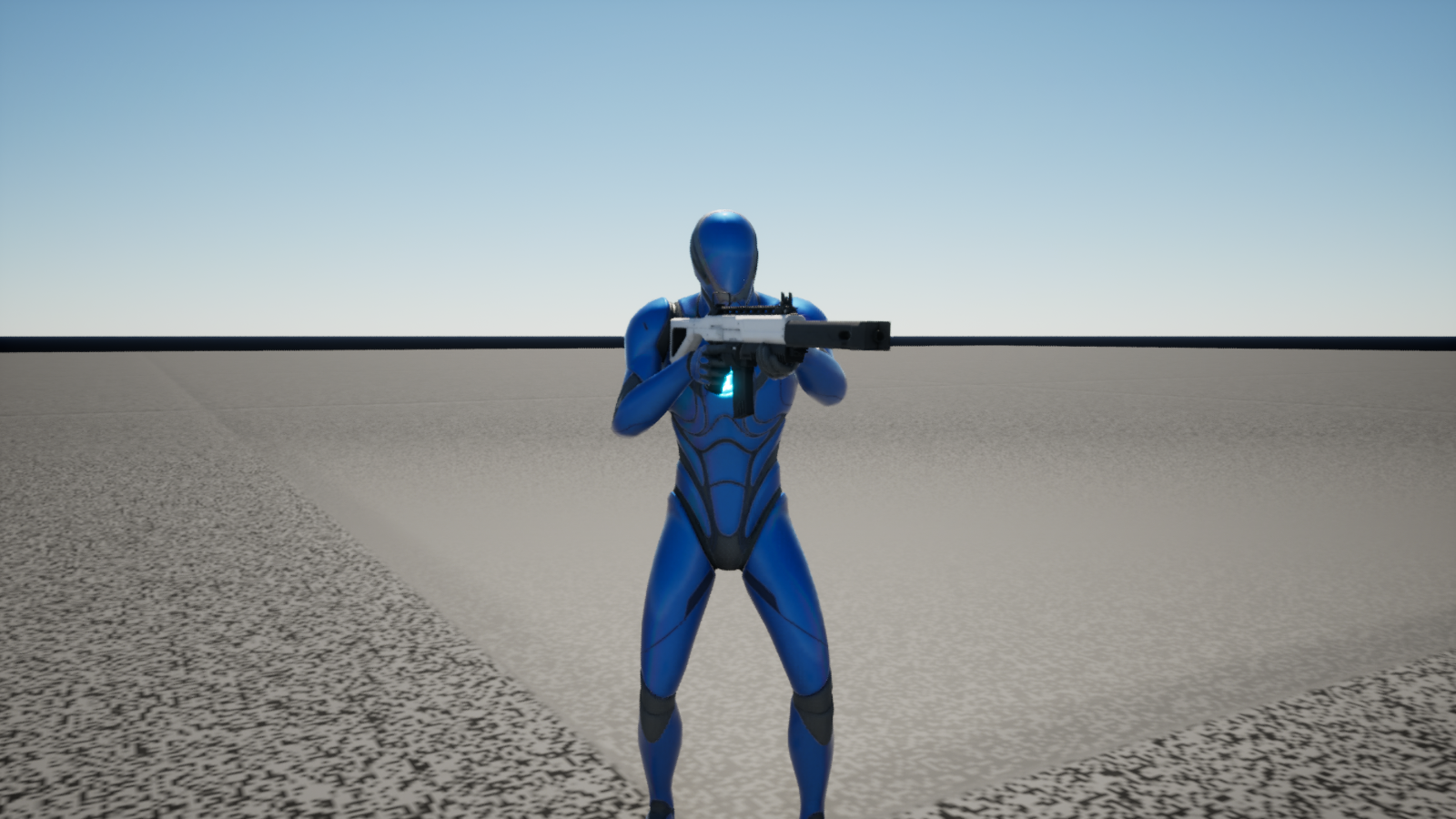
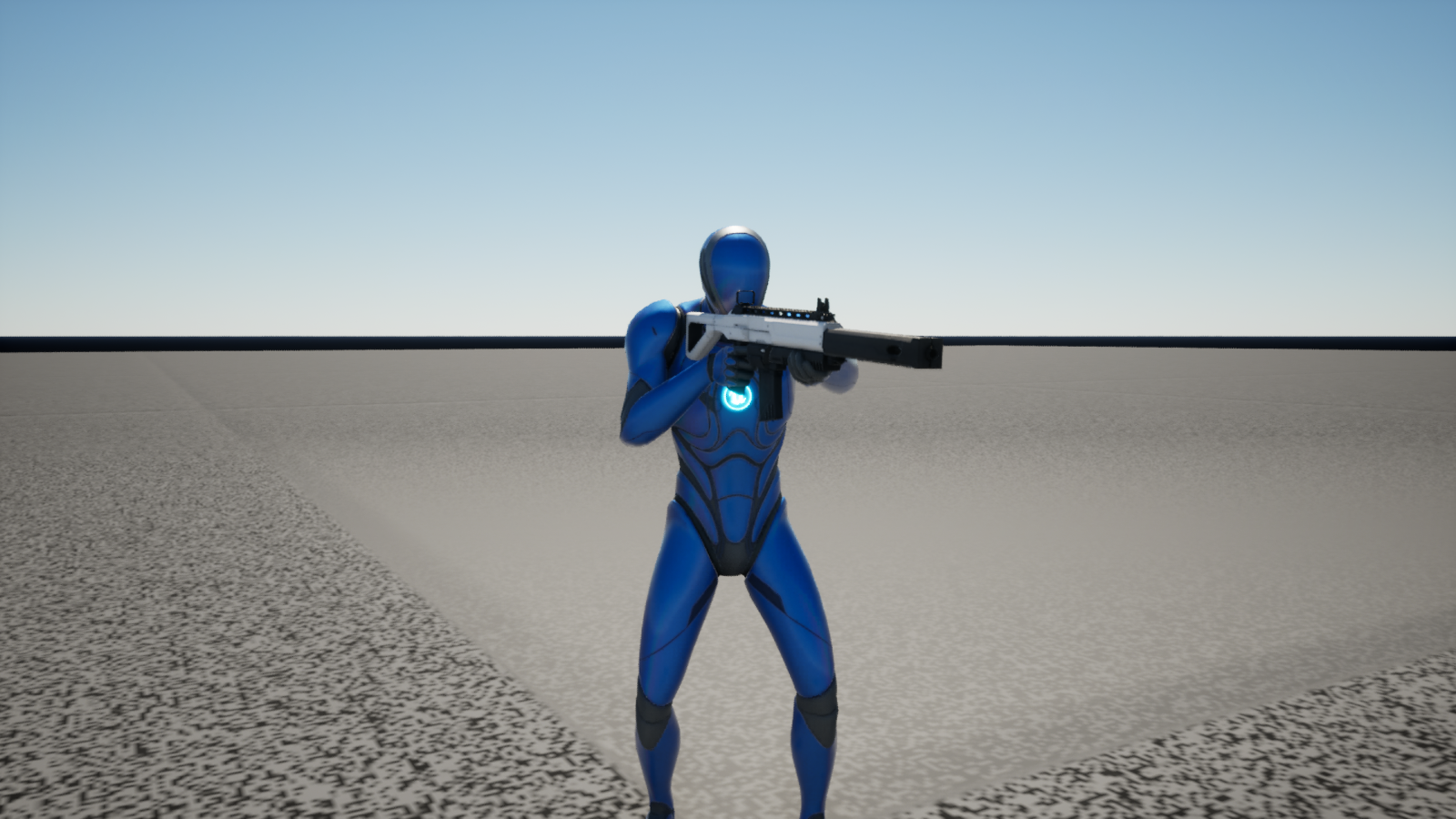
이 부분은 새로 만든 코드가 없다. Lyra는 DefaultGame.ini의 GAS 설정에서 ReplicateActivationOwnedTags를 켜 두었기 때문에, 어빌리티가 활성화되어 붙은 Event.Movement.ADS 태그가 다른 클라이언트에도 복제된다. Lyra의 3인칭 애님 블루프린트 ABP_Mannequin_Base는 이 태그로 GameplayTag_IsADS를 켜고 조준 자세를 고른다. GA_Fps_ADS에서는 카메라 노드만 지웠기 때문에 이 흐름은 그대로 남는다.
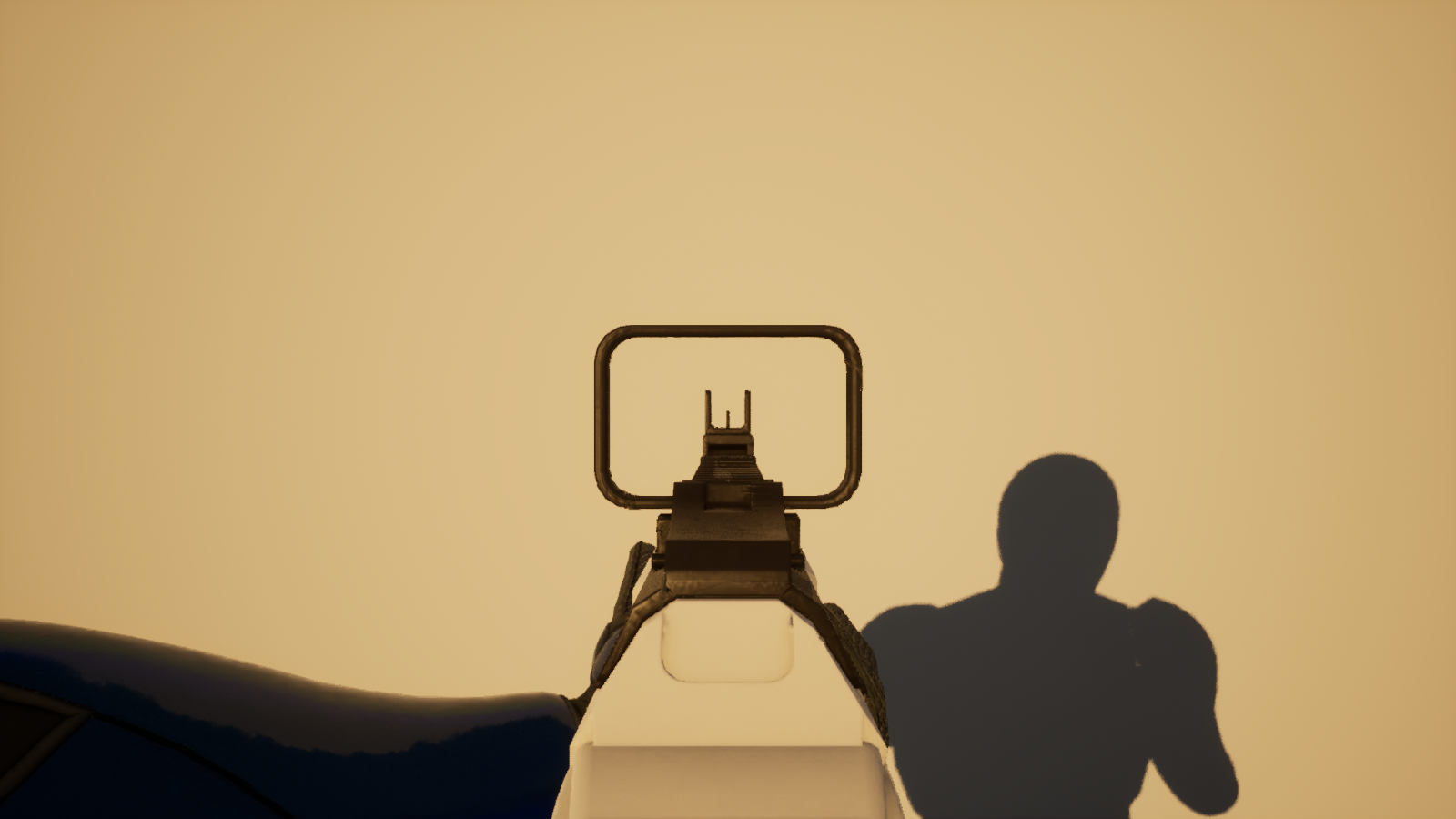
내 그림자도 3인칭 몸이 드리우기 때문에 정조준하면 그림자도 조준 자세가 된다.
확인
PIE에서 가늠자와 가늠쇠의 시점 기준 위치를 찍어 보면 (20, 0, 0), (52.5, 0, 0)이었다. 둘 다 시점 X축 위에 있으니 화면 정중앙이다.
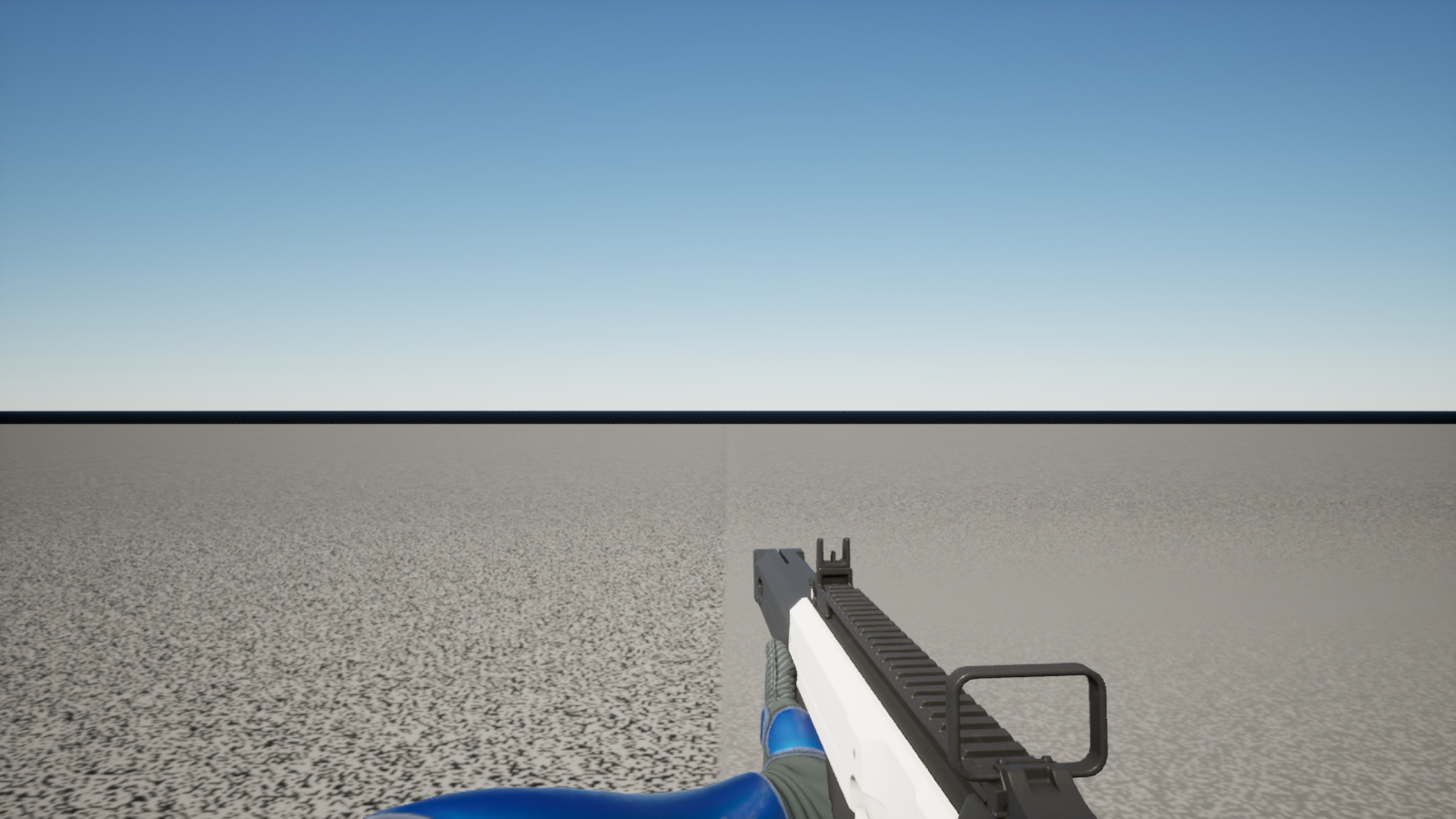
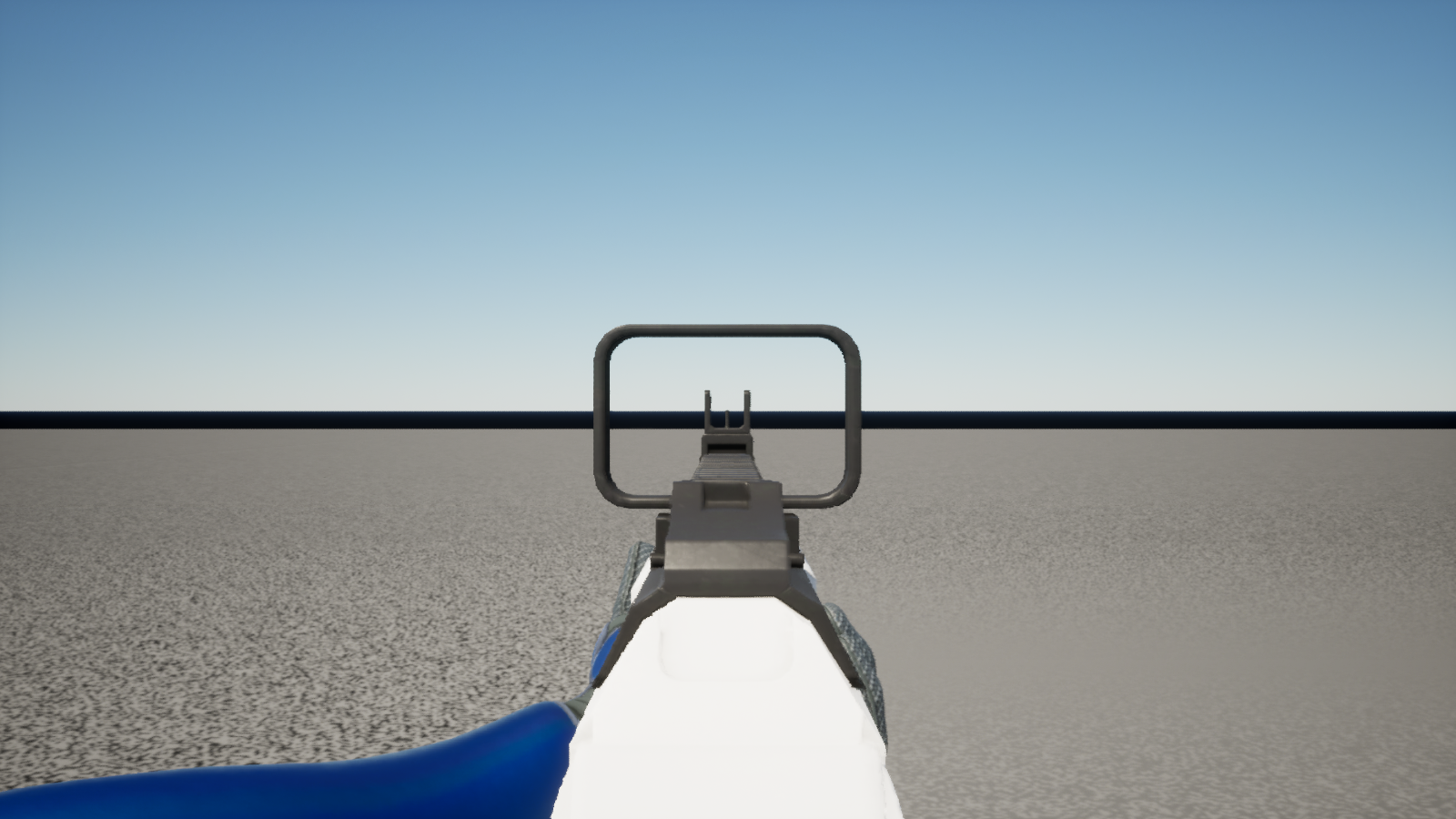
1인칭 애님 인스턴스를 고쳤으니 #2-1에서 만든 회귀 검사(https://duplicated.tistory.com/135)를 전부 돌렸다. 정조준 전과 같이 걷는 중 손목 항목 2개만 FAIL이었고, 새로 실패한 항목은 없었다.
완성된 모습
'게임개발일지 > 멀티플레이 FPS' 카테고리의 다른 글
| [언리얼5] 멀티플레이 FPS #2-1 automation tool 1인칭 리그 회귀 검사 (0) | 2026.10.27 |
|---|---|
| [언리얼5] 멀티플레이 FPS #2 1인칭 무기 장착과 자연스러운 파지법 (0) | 2026.10.27 |
| [언리얼5] 멀티플레이 FPS #1 풀바디 1인칭 카메라 (0) | 2026.08.16 |
| [언리얼5] 멀티플레이 FPS #0 - Lyra 프레임워크 기반 1인칭 슈팅 게임 만들기 (0) | 2026.08.16 |
| 언리얼 엔진 네트워크 FPS 게임 개발 일지#6 에임 오프셋 기능 개선 (1) | 2023.08.17 |